Pterodactyl/Wisp Automatic Stock
The Pterodactyl/Wisp Automatic Stock plugin synchronises your Pterodactyl or Wisp panel services stock levels with Blesta, ensuring accurate availability for your clients and reducing man hours.
From £14.99 - View Pricing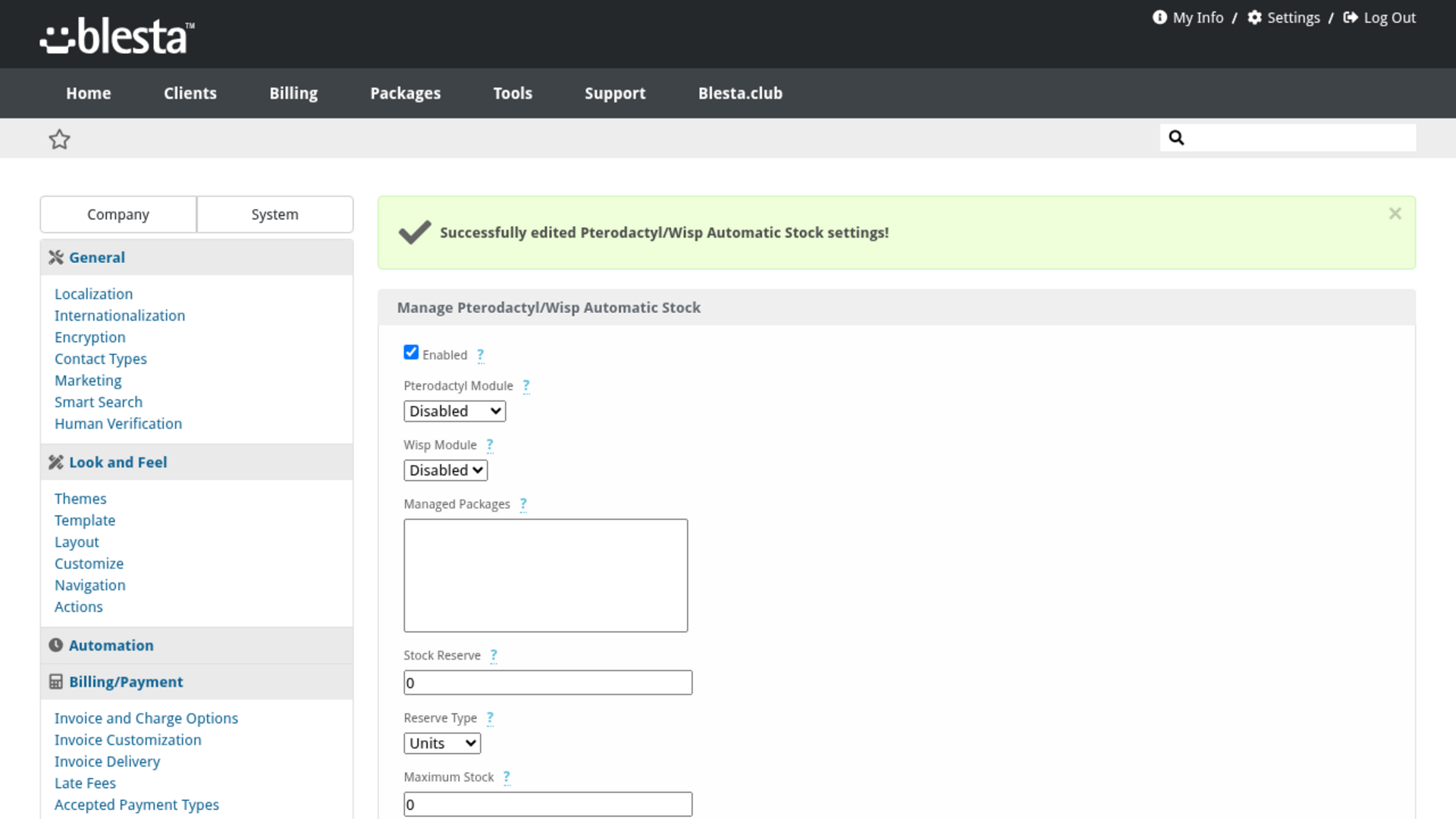
Features
What Pterodactyl/Wisp Automatic Stock gives you
Automatic Background Processing
Runs on Blesta's cron with no manual upkeep, so everything stays up to date on its own.
Per-Company Configuration
Configure it independently for each brand on a multi-company install, so every company runs with its own settings.
Fully Translatable
Every staff and client label ships in editable language files, ready to translate into any language or reword to match your brand.
Cap the Advertised Stock
Set a maximum quantity so a large node fleet never advertises an implausible number of slots, or leave it at zero for no cap at all.
Preview Before You Commit
See exactly what would change against your live data before anything is written, so a new configuration can be checked rather than trusted.
Built-In Demo Mode
A built-in demo mode runs the whole extension from bundled sample data, so you can trial every screen and action before you have an account or API key.
Pterodactyl and Wisp, Side by Side
Choose an installed Pterodactyl module, a Wisp module, or both, each set independently, so a mixed fleet is stocked from one screen and either side can be left switched off.
Choose Which Packages Are Managed
Restrict automatic stocking to the packages you pick, leaving hand-managed or promotional packages exactly as you set them. Select nothing and every package on the chosen modules is managed.
Email Alerts When a Run Fails
Have an email sent to any address you choose whenever a run hits an error such as an unreachable panel or a rotated API key, so a silent stock freeze does not become a lost weekend of sales.
Hold Capacity Back in Reserve
Keep a fixed number of slots, or a percentage of the calculated stock, permanently unsold as headroom for migrations, growth and support cases, instead of selling your nodes to the last megabyte.
Update Stock On Demand
A Save And Update Stock button runs the whole calculation immediately, and works even while automatic updating is switched off, so you can trial your settings and see the report before going live.
Only Deployable Nodes Count
Stock for a package is calculated from the nodes in the location that package deploys to, and any node in maintenance mode is left out entirely, so capacity you cannot actually sell never shows up as stock.
A Panel Outage Never Zeroes Your Stock
If the panel does not answer, or a package has no limit to constrain it, the existing quantity is left exactly as it is rather than being written down to zero, so an API hiccup can never take your products off sale.
Memory, Disk and CPU Together
How many more servers a package can fit is worked out across every resource its limits define, and whichever runs out first decides the number. A resource your panel does not report is left out of the calculation instead of being guessed at.
Stock That Keeps Itself Accurate
Package quantities are recalculated every few minutes from the capacity your panel nodes actually have free, so the storefront stops taking orders the moment you run out and starts again the moment a customer cancels. Nobody has to remember to edit a quantity again.
Detailed Last Run Report
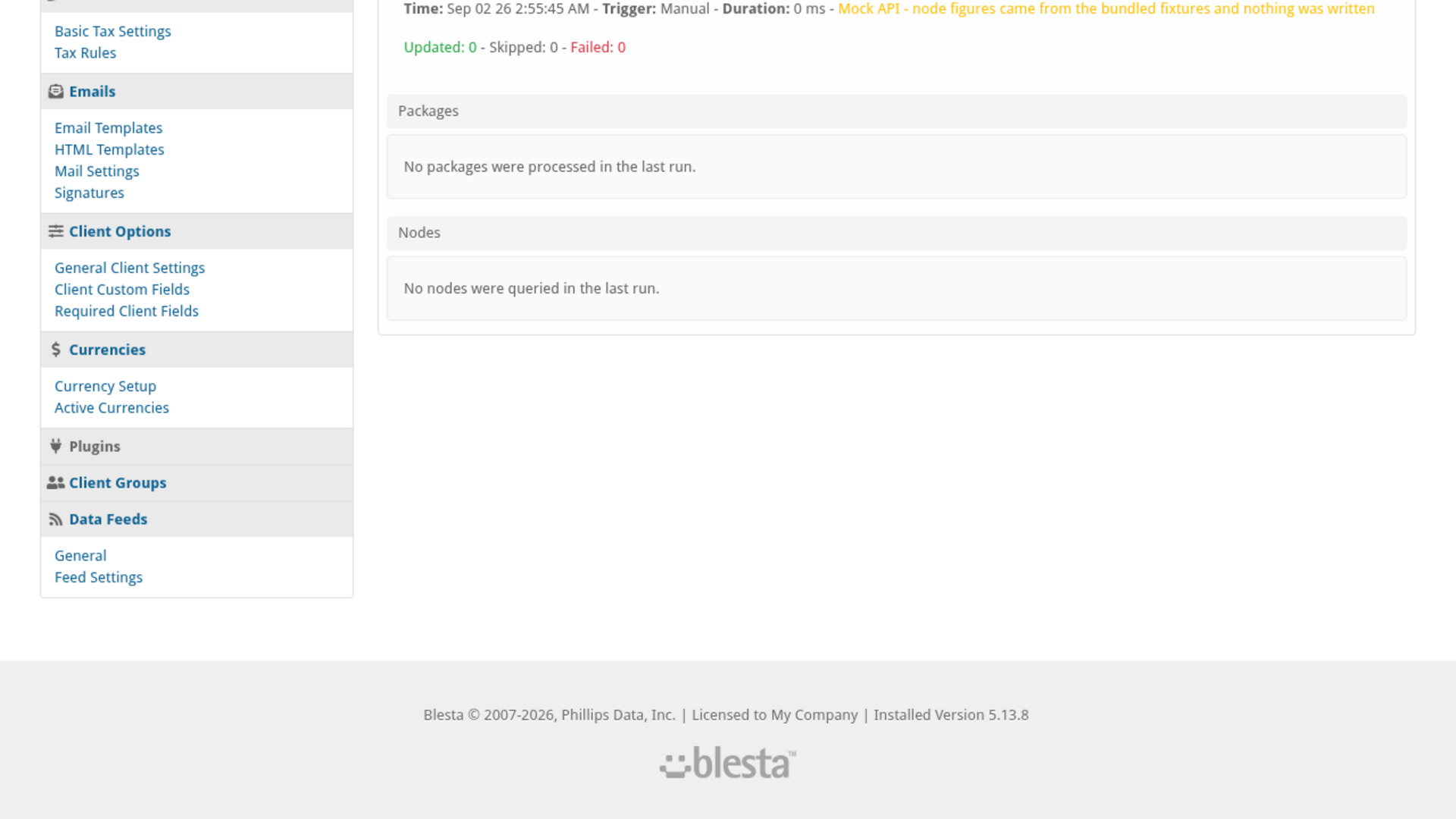
The settings screen shows the last run's time, trigger, duration and updated, skipped and failed counts, with a per-package table of previous versus calculated stock and the constraint that decided it, plus every node's capacity, allocated and free figures and whether it answered.

Pterodactyl/Wisp Automatic Stock
Your game server package stock always matches the capacity actually free on your Pterodactyl and Wisp nodes, so you never oversell and never leave sellable capacity hidden.
What it does
Selling game servers off a fixed package quantity means either overselling past what your nodes can actually hold, or leaving real capacity unsold because nobody remembered to raise the number. Pterodactyl/Wisp Automatic Stock recalculates package stock itself, every few minutes, straight from the free memory, disk and CPU your Pterodactyl and/or Wisp nodes are actually reporting. The moment a node fills up, the storefront stops selling that package; the moment a client cancels and frees up room, it starts selling again - with no one editing a quantity by hand.
Key features
- Stock That Keeps Itself Accurate: Package quantities are recalculated on a schedule from the capacity your panel nodes actually have free, so nobody has to remember to edit a quantity again.
- Memory, Disk and CPU Together: How many more servers a package can fit is worked out across every resource its limits define, and whichever runs out first decides the number. A resource your panel doesn't report is left out of the calculation instead of being guessed at.
- Pterodactyl and Wisp, Side by Side: Choose an installed Pterodactyl module, a Wisp module, or both, each set independently, so a mixed fleet is stocked from one screen.
- Only Deployable Nodes Count: Stock is calculated from the nodes in the location a package deploys to, and any node in maintenance mode is left out entirely.
- Hold Capacity Back in Reserve: Keep a fixed number of slots, or a percentage of the calculated stock, unsold as headroom for migrations, growth and support cases.
- Cap the Advertised Stock: Set a maximum quantity so a large node fleet never advertises an implausible number of slots.
- Choose Which Packages Are Managed: Restrict automatic stocking to the packages you pick, leaving hand-managed or promotional packages exactly as you set them.
- Preview Before You Commit: Dry-run mode computes and reports a run without writing anything, so a new configuration can be checked before it goes live.
- Detailed Last Run Report: The settings screen shows the last run's time, trigger, duration and updated/skipped/failed counts, with a per-package and per-node breakdown.
- Email Alerts When a Run Fails: Get an email whenever a run hits an error such as an unreachable panel or a rotated API key.
- A Panel Outage Never Zeroes Your Stock: If the panel does not answer, or a package has no limit to constrain it, the existing quantity is left exactly as it is instead of being written down to zero.
- Update Stock On Demand: A Save And Update Stock button runs the whole calculation immediately, even while automatic updating is switched off.
Enhance your Pterodactyl and Wisp stock management with Pterodactyl/Wisp Automatic Stock by Blesta.Club.
Installing and updating extensions can now be done automatically through the Blesta Club Subscription Manager - this is the recommended way going forward.
Installing Pterodactyl/Wisp Automatic Stock
Before you start
- If you are on the leased (subscription) licence, the Blesta Club Subscription Manager must be installed and your subscription active. The owned and owned-source licences have no such requirement.
- You need Blesta's own Pterodactyl and/or Wisp module already installed and configured with at least one node - this plugin restocks packages those modules already provision, it does not connect to either panel on its own. You can set up either one, or both.
1. Upload the files
Upload the extension folder into your Blesta installation so it lands under your Blesta directory at:
plugins/pterodactyl_wisp_automatic_stock/For example, on a typical install: /var/www/html/blesta/plugins/pterodactyl_wisp_automatic_stock/
2. Install it in Blesta
- Log in to your Blesta admin area with a staff account that has access to Settings > Company > Plugins.
- Go to Settings > Company > Plugins and click the Available tab.
- Find Pterodactyl/Wisp Automatic Stock in the list and click Install.
3. Configure it
- Click Manage next to Pterodactyl/Wisp Automatic Stock on the Plugins page.
- Select a Pterodactyl Module and/or a Wisp Module to stock from - leave either one on Disabled if you don't use that panel. A demo mode is available (tick Mock API) if you want to see a report before pointing it at a real panel.
- Optionally set a Managed Packages list, a stock reserve, a maximum stock cap, dry-run mode, and an email address to notify on failure - all covered in the usage guide.
- Tick Enabled and save. A cron task is registered automatically and runs every 5 minutes from then on - no separate setup is needed for it.
You're ready to go - see the usage guide for a walkthrough of day-to-day use.
Installing and updating extensions can now be done automatically through the Blesta Club Subscription Manager - this is the recommended way going forward.
Updating Pterodactyl/Wisp Automatic Stock
Upgrading works just like installing: upload the new files over the old ones, then run the upgrade from the same page you installed it on.
- Back up your current extension files first - good practice before any upgrade.
- Upload the new version over the existing folder, replacing the old files.
- Log in to your Blesta admin area and go to Settings > Company > Plugins.
- Find Pterodactyl/Wisp Automatic Stock and click Update to run the upgrade.
Version-specific notes
- v1.1.0: Fixes several stability issues in the stock calculation and adds a fixture-backed mock mode for testing; no settings are added and nothing needs reconfiguring.
- v2.0.0: Adds a Last Stock Run report panel, a managed-package selector, a stock reserve and maximum-stock cap, a dry-run mode, optional email notification on failure, and excludes nodes in maintenance mode from stock calculations. Your existing settings carry over unchanged - the new options default to off (every package managed, no reserve, no cap, dry run off, notifications off) until you choose to turn them on.
Using Pterodactyl/Wisp Automatic Stock
For your staff
The settings screen (Settings > Company > Plugins > Manage)
Everything lives on one screen:
- Enabled: Turns the automatic cron-driven updates on or off. The settings can still be saved, and a manual run performed, while this is unticked.
- Pterodactyl Module / Wisp Module: The installed module(s) to stock from, set independently - choose Disabled on either one to leave that side out entirely. You can run both at once.
- Mock API: Runs against bundled sample data instead of your real panel - useful for seeing what a run and its report look like before you have live nodes to point at. A run made with this ticked never writes a package quantity.
- Managed Packages: Restrict automatic stocking to the packages you pick here. Leave nothing selected to manage every package on the chosen modules.
- Stock Reserve: Hold back a fixed number of units, or a percentage of the calculated stock, so the advertised quantity always sits a little below what the nodes could technically fit.
- Maximum Stock: Cap the highest quantity a package will ever advertise. Leave it at 0 for no cap.
- Dry Run: Compute and report a run without writing any package quantities, so you can preview the effect of a settings change before it goes live.
- Notify On Failure / Notification Email: When ticked, an email is sent to the address you enter whenever a run reports an error, such as an unreachable panel.
Click Save to store your settings, or Save And Update Stock to save and immediately run the calculation - this works even while Enabled is unticked, so you can preview a run before switching automatic updates on.
Reading the Last Stock Run report
After any run - scheduled or manual - the same screen shows a report below the settings form: the run's time, what triggered it, how long it took, and how many packages were updated, skipped or failed. Each package lists its previous and newly calculated stock and which resource (memory, disk or CPU) decided the number, and each node lists its capacity, allocated and free figures, whether it answered, and whether it's in maintenance mode. A run made with Mock API or Dry Run is labelled as such, and a package left unchanged because nothing could be measured is reported as skipped rather than silently zeroed.
Good to know
- Stock is only ever written when something was actually measured - an unreachable panel, a package's location no longer existing on the panel, every node at that location being in maintenance, or an unlimited package all leave the existing quantity untouched rather than writing it down to zero.
- A package's stock is whichever of memory, disk or CPU runs out first; a resource the panel doesn't report for a node (Pterodactyl reports no per-node CPU figure) is simply left out of that calculation rather than guessed at.
- Nodes in maintenance mode never count toward a package's stock.
- Mock API and Dry Run are independent switches - either one on its own is enough to stop a run from writing anything.
v2.0.0 - 2026-09-11
PHP 7.2 - 7.4, 8.1 - 8.4 · Blesta 5.x
Fixed multiple errors from the same run overwriting each other in the report and notification email instead of all being listed
Added a Last Stock Run panel on the manage screen reporting per-package and per-node results
Added a managed-package selector so only chosen packages are restocked (empty still means all)
Added a stock reserve (units or percent), a maximum stock cap, and a dry-run mode
Added an optional email notification when a run reports an error
Nodes in maintenance mode are now excluded from stock calculations
Failed runs are now written to the system log
Manual "Save And Update Stock" now runs even when the plugin is disabled, so a run can be previewed
Fixed a package whose panel location no longer exists, or all of whose nodes are in maintenance, being marked out of stock instead of left alone
Fixed the panel status being read from an interim response such as a proxy's "103 Early Hints", which made a healthy panel look unreachable and skipped every package
The panel's TLS certificate is now verified, and the TLSv1 floor that weakened the connection has been removed
Added a license check to the settings form
Fixed the settings form checkboxes rendering on their own line beneath their label
v1.0.0 - 2024-09-22
PHP 7.2 - 7.3, 8.1 - 8.4 · Blesta 5.x
Blesta Club release
Pricing Options
Get exactly what you need and want.
Requires PHP 7.2 - 7.4, 8.1 - 8.4 · Blesta 5.x
Included In
Value: £42.3
- +51 Other Extensions
- Additional Discounts
- Included Support & Updates
Leased
- Partially Encoded
- Full Functionality
- Included Support & Updates
Owned
- Partially Encoded
- Buy Once Use Forever
- 1 Year Support & Updates
Owned - Source
- Source Available
- Buy Once Use Forever
- 1 Year Support & Updates
Not sure whether to lease or own? Our FAQ explains how the licence types differ.
Reviews
What our customers say
(0 customer reviews)
Seems like this extension doesn't have reviews yet...
Be one of the firsts to leave a review!
It is possible to leave a review only if you have purchased this extension or a Club tier which contains it.
We reserve the right to alter wording or formatting for presentation.
We will discuss any changes made and offer the option to withdraw review text if the changes can't be agreed on.
It may take up to 1 hour for a review to appear or update due to caching.
You might also like
More extensions to explore

Plugin
Announcements
Integrate the Announcements plugin to provide updates and news to your clients.
PHP 8.2 - 8.4 · Blesta 6.x




Plugin
Credit Awards
Give your clients rewards based upon service purchases.
PHP 8.2 - 8.4 · Blesta 6.x