Client Data Changelog
The Client Data Changelog plugin adds a widget to the staff client profile with a clear history of every change to the account and its contacts. It shows the old and new value side by side, and you can filter by date or export the history to CSV.
Free - View Pricing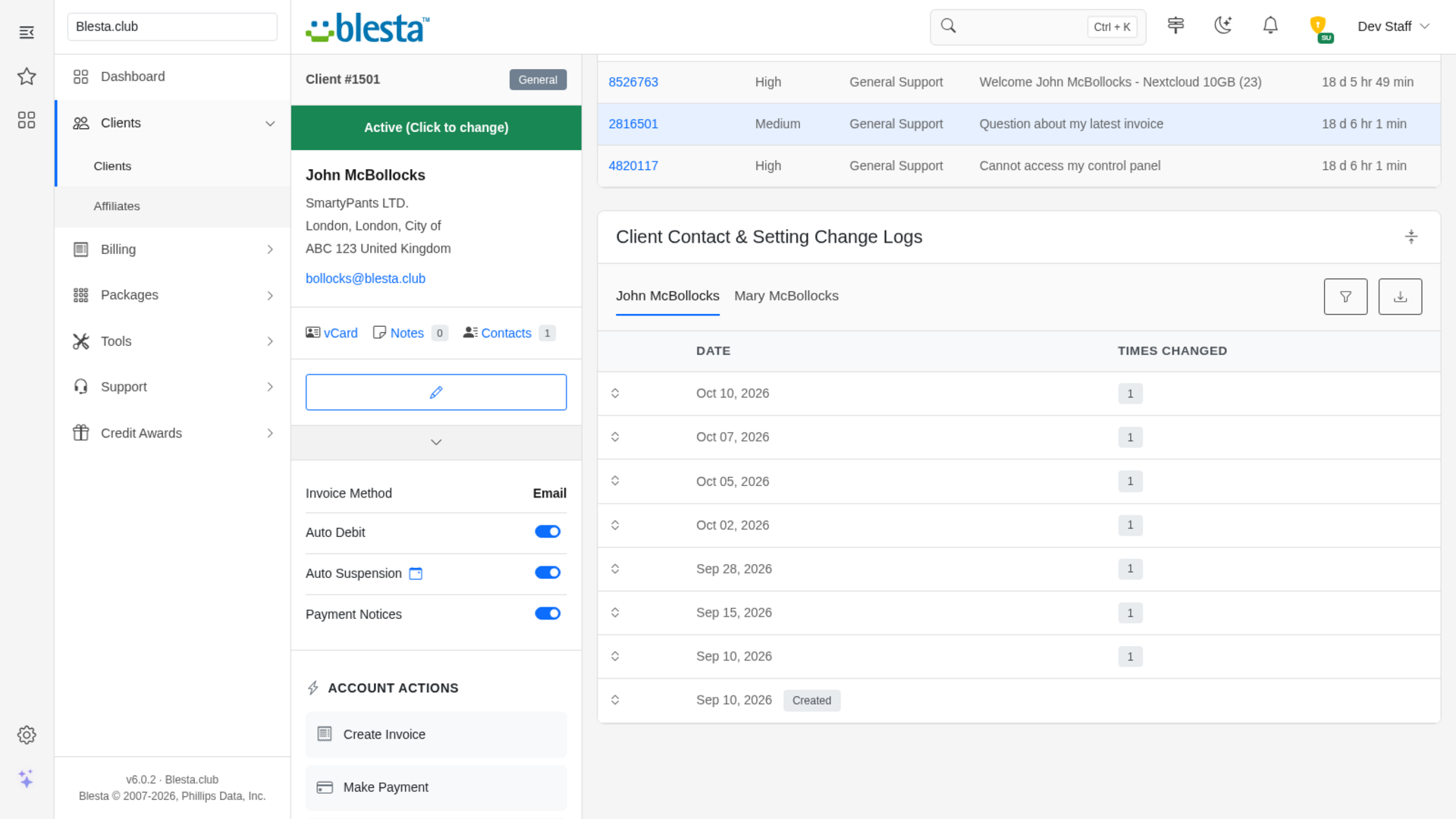
Features
What Client Data Changelog gives you
Per-Staff-Group Permission
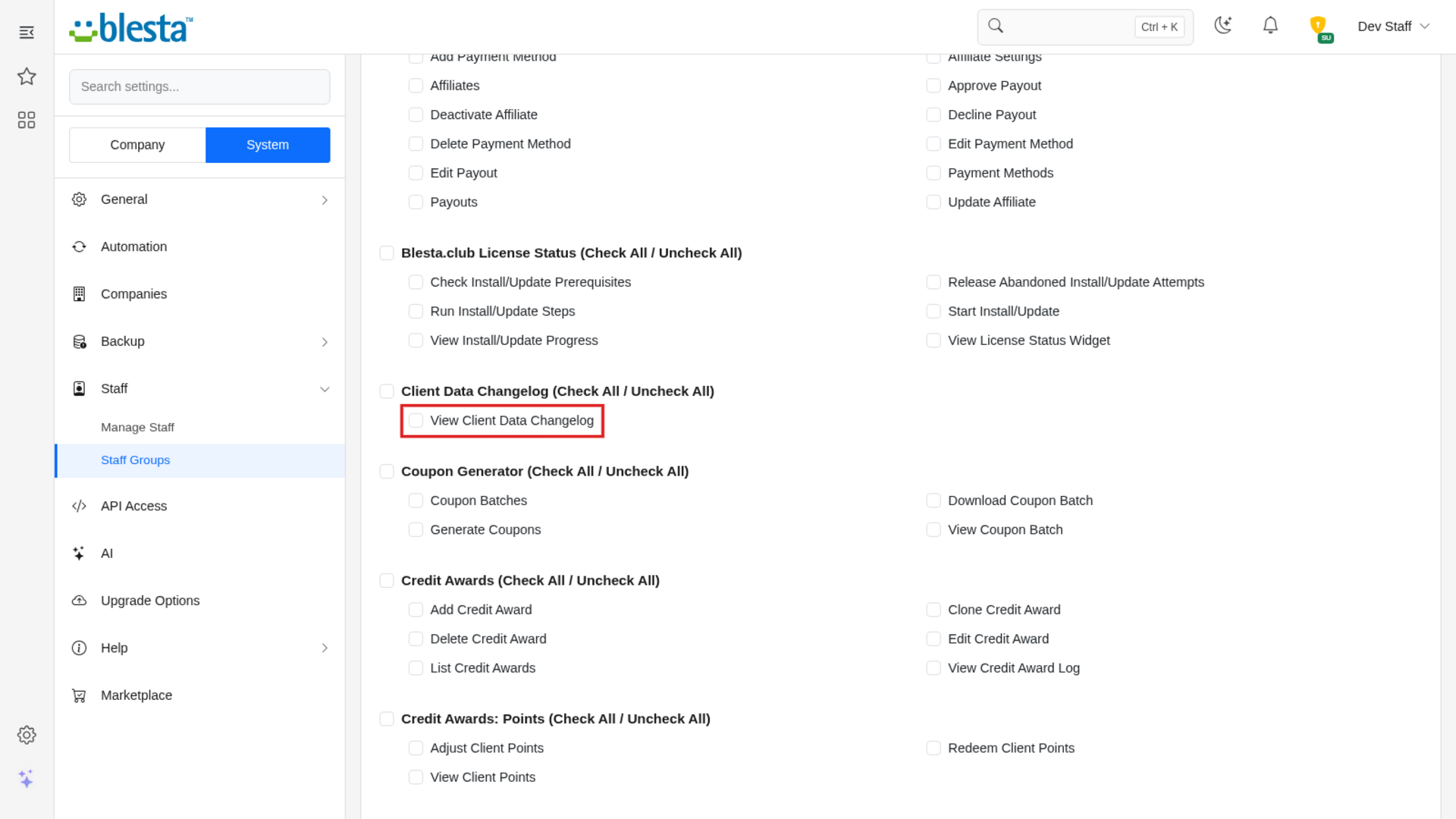
Viewing client change history is its own staff permission, so you decide which staff groups may see it.
Date Range Filter
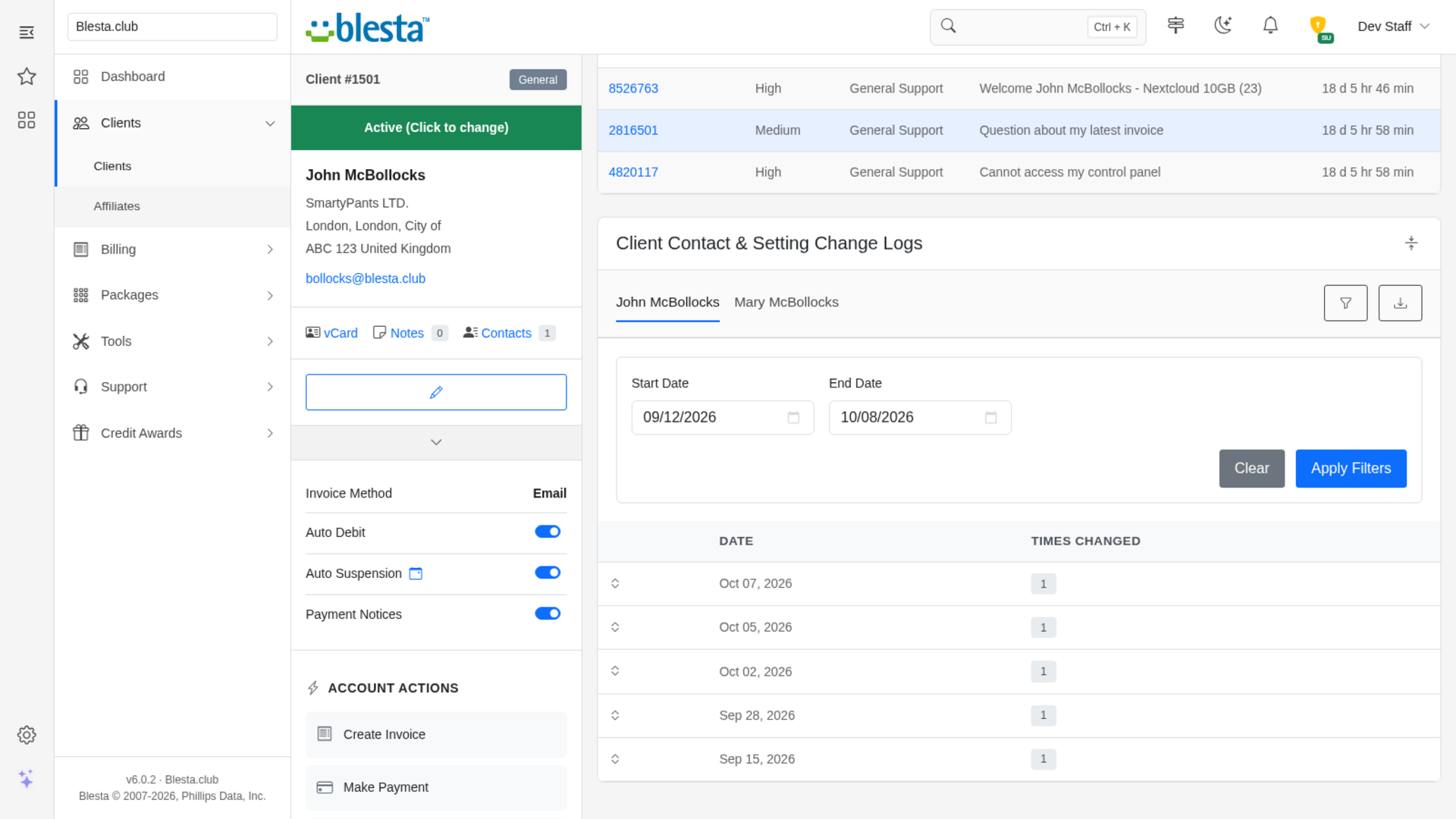
Narrow a long history to a start and end date, with the filter carried across contact tabs and into the export.
Per-Company Configuration
Configure it independently for each brand on a multi-company install, so every company runs with its own settings.
Fully Translatable
Every staff and client label ships in editable language files, ready to translate into any language or reword to match your brand.
End-of-Day Snapshots
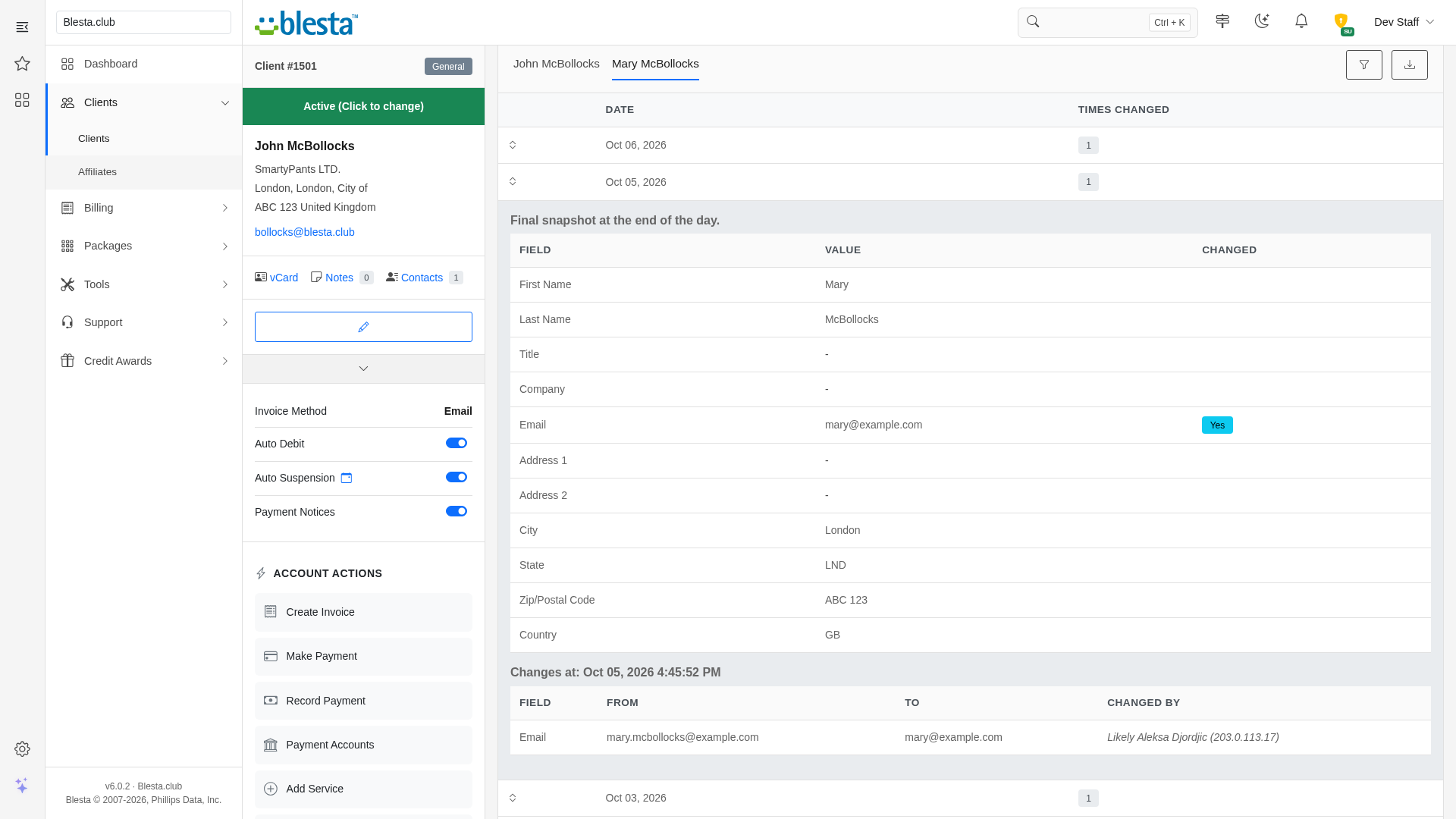
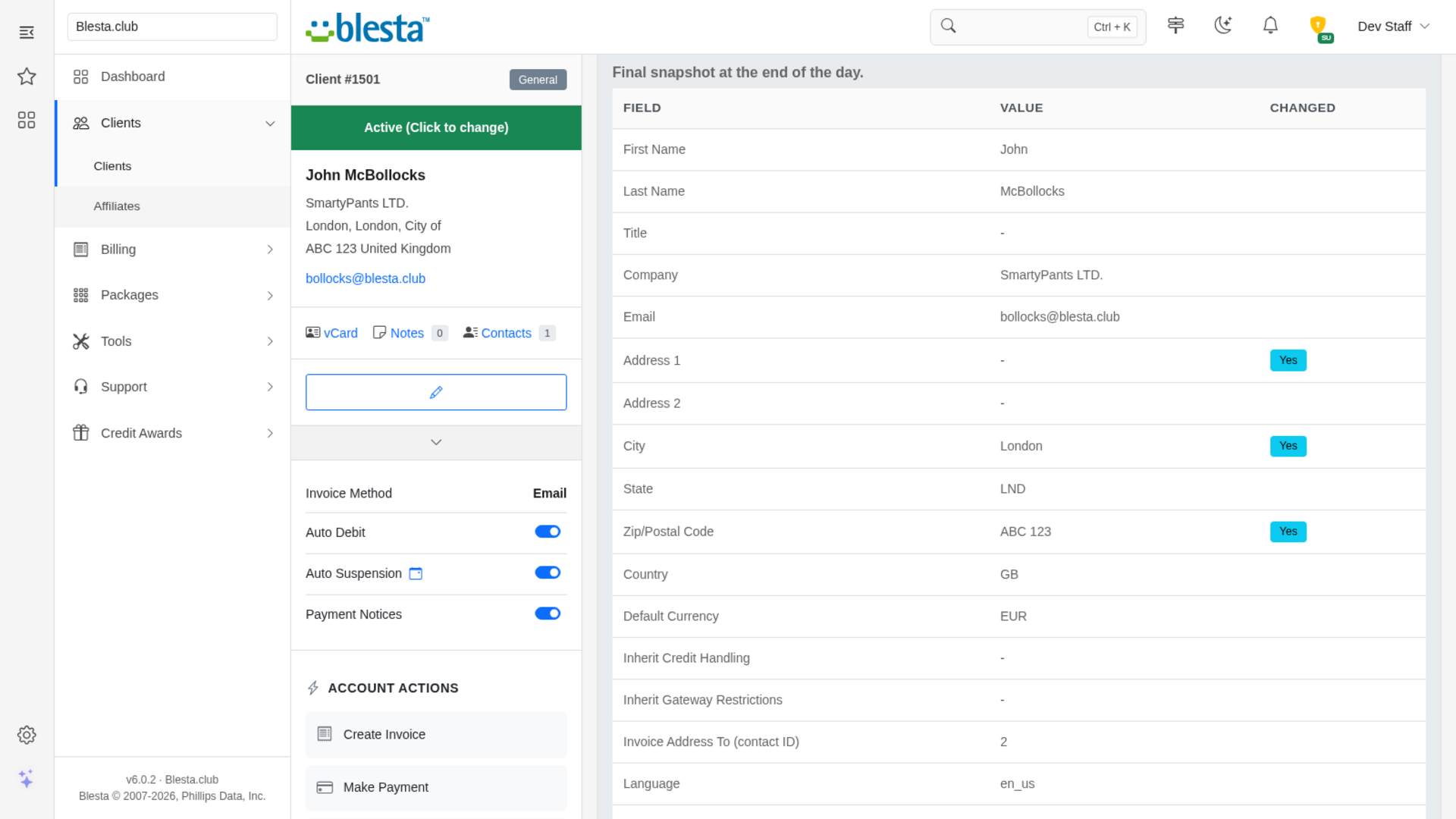
Open any day to see the value of every tracked field as it stood at the end of that day, with the fields that changed that day flagged.
Exact Before-and-After Values
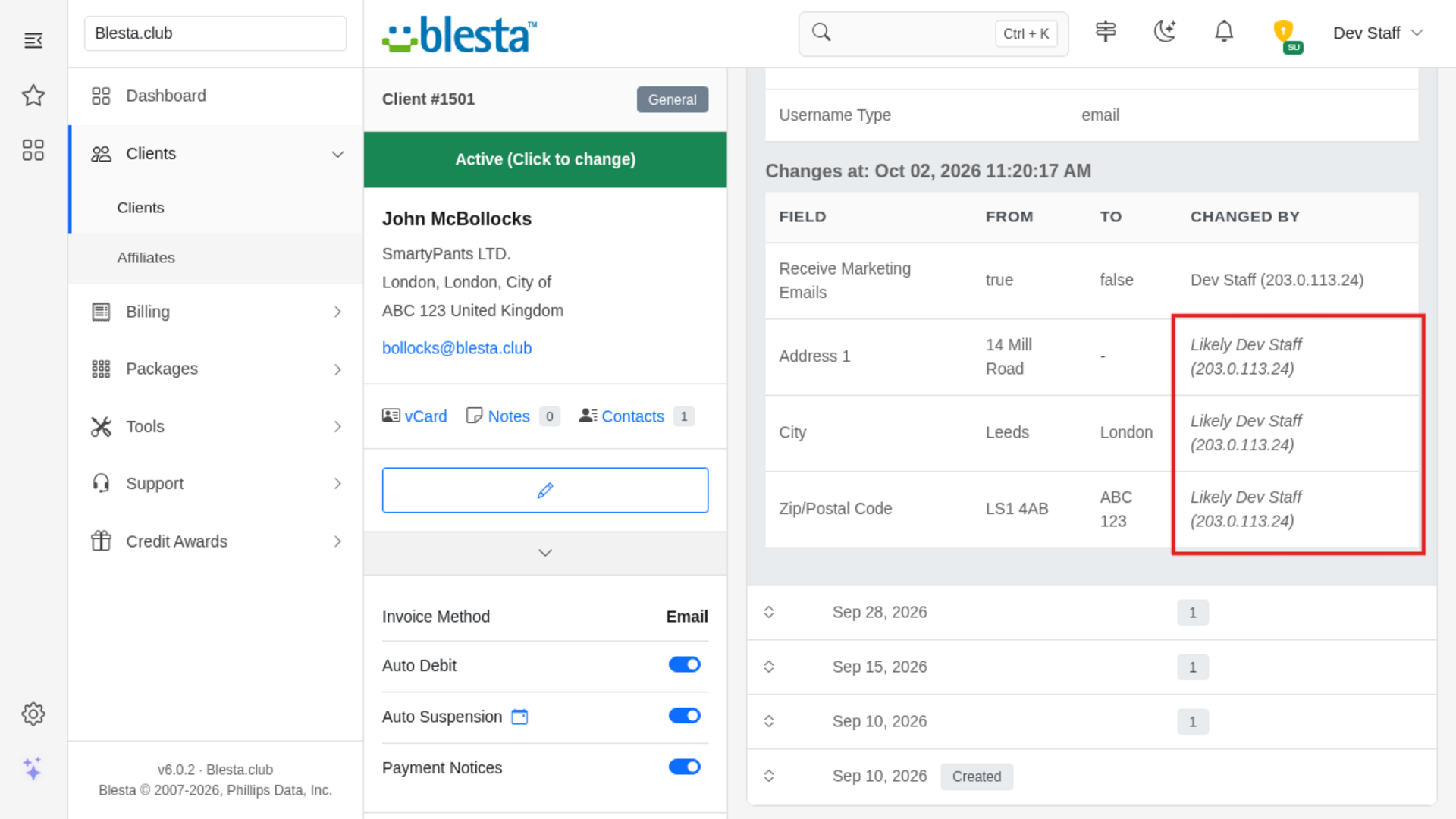
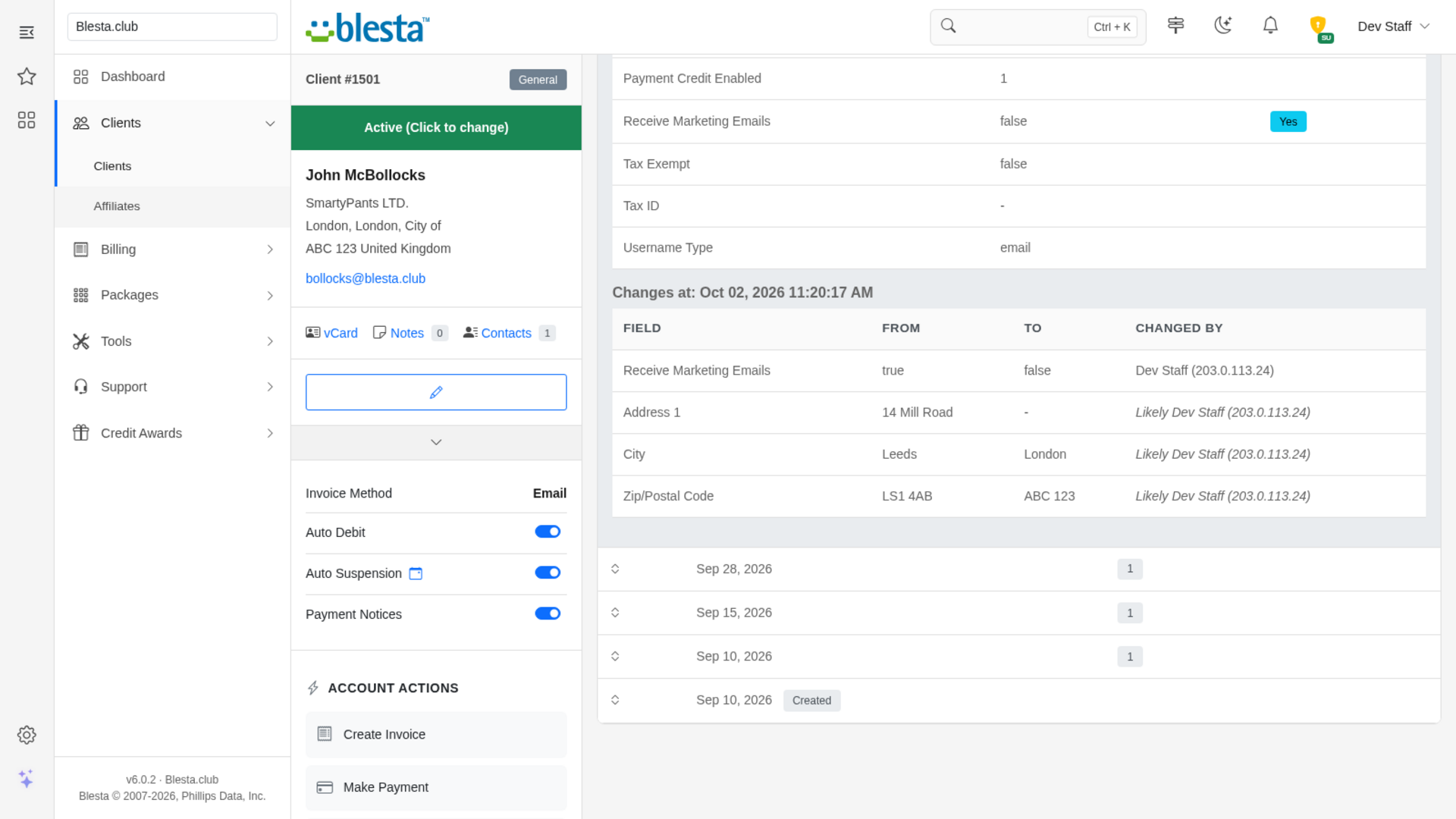
Every change is listed at the second it happened with the old and the new value side by side, so you can see precisely what was edited.
One-Click CSV Export
Download a contact's history as a CSV for record keeping or a dispute, one row per changed field with date, time, old value, new value and who made the change.
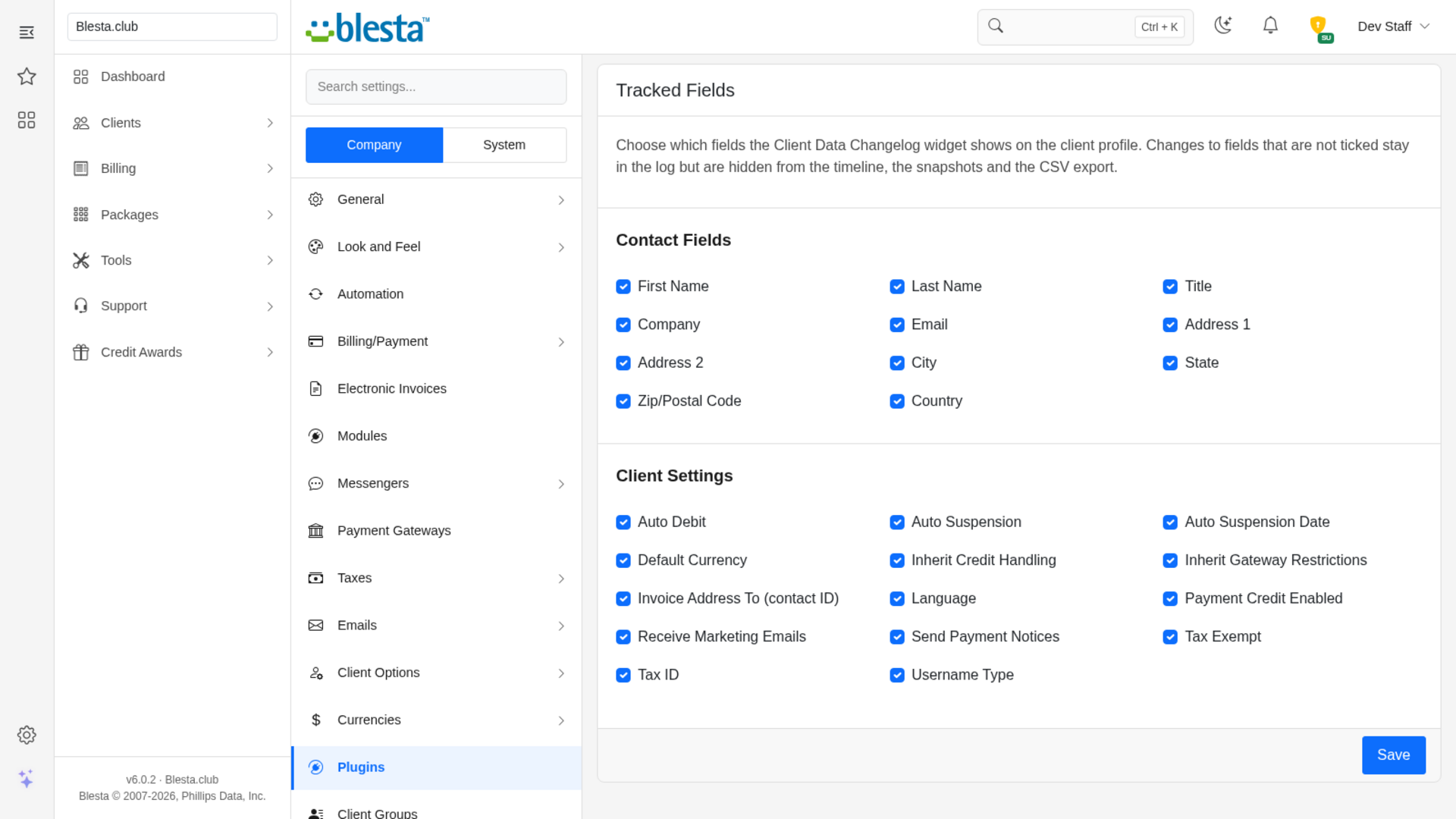
Choose Which Fields to Track
Pick from the Manage page which contact details and account settings the timeline, snapshots and export show, from first name and address to tax ID and invoice address.
Change History on Every Client Profile
A widget on the staff client profile lists everything that changed on the account, newest first, so your team can answer "who changed this?" without digging through logs.
Uses the History Blesta Already Keeps
Nothing new is recorded and no tables are added to your database - the widget reads the change logs Blesta already writes, so it works on your existing clients straight away.
A Timeline for Every Contact
Each contact gets its own tab with a day-by-day history of their name, company and address changes, and the primary contact's tab also shows account setting changes such as currency handling and tax details.
Know Who Made the Change
Account setting changes show the staff member or client and the IP address they came from. Contact detail changes are marked "Likely" when they can be matched to a setting change made at the same moment, and "Unknown" when they cannot, so you are never given a guess as fact.

Client Data Changelog
See exactly what changed on a client's account, when it changed and who did it, right on their profile.
What it does
When a client says "I never changed that" or a colleague asks who edited an address last week, Blesta has the answer in its logs but no friendly way to read it. Client Data Changelog adds a widget to the staff client profile that turns those logs into a clear history: a tab for every contact, a day-by-day timeline, the exact old and new value of every change, and who made it. It only reads what Blesta already records, so it works on your existing clients straight away.
Key features
- Change history on every client profile: A widget on the staff client profile lists everything that changed on the account, newest first, so your team can answer "who changed this?" without digging through logs.
- A timeline for every contact: Each contact gets its own tab with a day-by-day history of their name, company and address changes, and the primary contact's tab also shows account setting changes such as currency handling and tax details.
- End-of-day snapshots: Open any day to see the value of every tracked field as it stood at the end of that day, with the fields that changed that day flagged.
- Exact before-and-after values: Every change is listed at the second it happened with the old and the new value side by side.
- Know who made the change: Account setting changes show the staff member or client and the IP address they came from. Contact detail changes are marked "Likely" when they can be matched to a setting change made at the same moment, and "Unknown" when they cannot, so you are never given a guess as fact.
- Date range filter and CSV export: Narrow a long history to a start and end date, and download it as a CSV for record keeping or a dispute.
- Choose which fields to track: Pick which contact details and account settings the timeline, snapshots and export show.
- Access you control: Viewing client change history is its own staff permission, so you decide which staff groups may see it.
Installing and updating extensions can now be done automatically through the Blesta Club Subscription Manager - this is the recommended way going forward.
Installing Client Data Changelog
Before you start
- Version 3.x requires Blesta 6.0 or later.
- If you are on the leased (subscription) licence, the Blesta Club Subscription Manager must be installed and your subscription active. The owned and owned-source licences have no such requirement.
1. Upload the files
Upload the extension folder into your Blesta installation so it lands under your Blesta directory at:
plugins/client_data_changelog/For example, on a typical install: /var/www/html/blesta/plugins/client_data_changelog/
2. Install it in Blesta
- Log in to your Blesta admin area with a staff account that has the Plugins permission (found under Settings in the Access Control List when you edit a staff group).
- Go to Settings > Company > Plugins and click the Available tab.
- Find Client Data Changelog in the list and click Install. You'll see a message confirming the plugin installed and reminding you that any permissions it registered still need to be granted to your staff groups.
3. Configure it
- Go to Settings > System > Staff > Staff Groups, edit each staff group that should see client change history, and tick View Client Data Changelog under Client Data Changelog in the Access Control List, then save. Installing grants it to your own staff group only; tick it for every other group that should see it.
- Optional: from the Installed tab, click Manage next to Client Data Changelog to choose which fields the history shows. Every field is tracked until you save a different selection.
There is nothing else to set up: the widget appears on every client profile for staff who have the permission and reads the change history Blesta already keeps.
You're ready to go - see the usage guide for a walkthrough of day-to-day use.
Installing and updating extensions can now be done automatically through the Blesta Club Subscription Manager - this is the recommended way going forward.
Updating Client Data Changelog
Upgrading works just like installing: upload the new files over the old ones, then run the upgrade from the same page you installed it on.
- Back up your current extension files first - good practice before any upgrade.
- Upload the new version over the existing folder, replacing the old files.
- Log in to your Blesta admin area and go to Settings > Company > Plugins.
- Find Client Data Changelog and click Update to run the upgrade.
Version-specific notes
- v1.0.0: Initial release. It requires Blesta 6.0 or later. Installing grants the plugin's permission to your own staff group only, so grant View Client Data Changelog to every other staff group that should see the widget (Settings > System > Staff > Staff Groups); until you do, staff in those groups do not see it. By default every supported field is tracked; use Manage on the Installed tab to change that.
Using Client Data Changelog
This is a staff tool - your clients never see anything it adds to Blesta.
For your staff
Reading a client's history
Open any client's profile. The Client Contact & Setting Change Logs widget is the last card on the page, after widgets such as Services, Invoices and Tickets, and it loads a moment after the rest of the page. It shows one tab for each of the client's contacts; the tab of the contact you are looking at is highlighted. Use the arrow at the top right of the widget to collapse or expand it.
Each row is a day on which something changed, newest first, with how many separate times it changed that day. Click a row to open it:
- Final snapshot at the end of the day lists every tracked field with its value as it stood when the day ended. A Yes in the Changed column marks the fields that changed that day.
- Changes at blocks, one for each moment something changed, list each field with its From and To values and who made the change under Changed By. Empty values show as a dash.
The last row, marked Created, shows how the contact looked when it was first added. Click an open row again to close it. When the history is longer than one page, use the page links under the list.
Who made the change
For account setting changes (for example currency handling or tax details) Blesta records the person and the IP address, and the widget shows them as the staff member's name, or the client's login, followed by the IP address in brackets.
Blesta does not record who edited a contact's own details such as name, company or address. When a contact change happened at the very same second as an account setting change by one person, the widget shows that person in italics as Likely (hover it for the explanation). When there is no such match, or more than one person acted at that second, it shows Unknown. It never guesses beyond that.
Narrowing the history by date
Click the funnel icon in the widget's tab bar to open the filters, enter a Start Date and/or End Date and press Apply Filters. The list, the page links and the export all follow the range, and it stays applied while you switch between contact tabs. Press Clear to see the whole history again.
Exporting to CSV
Click the download icon in the widget's tab bar to download the shown contact's history as a CSV file. There is one row per changed field, oldest first, with the date, the date and time in your company's time zone, the field, the old and new value, who made the change, whether that is Recorded, Likely or Unknown, and the IP address. The export follows the date range and the tracked fields you have set.
Choosing which fields are tracked
Go to Settings > Company > Plugins, open the Installed tab and click Manage next to Client Data Changelog. The page lists every field the history can show, grouped into Contact Fields and Client Settings. Untick the ones you do not want and click Save; at least one field must stay ticked. The choice applies to the snapshots, the change lists and the export for your company. Fields you untick are only hidden - the underlying history is untouched, and ticking them again brings it back.
Good to know
- The widget only appears for staff whose group has the View Client Data Changelog permission.
- The widget also needs a valid Blesta Club licence for the plugin (on the leased licence, the Blesta Club Subscription Manager installed and your subscription active). Without one, the widget is not shown.
- The history is only as complete as the logs Blesta keeps. If your installation is configured to delete old contact or client setting logs, those older changes cannot be shown.
- A day on which only fields you do not track changed does not appear in the history.
v1.0.0 - 2026-10-31
PHP 8.2 - 8.4 · Blesta 6.x
Initial release
Pricing Options
Get exactly what you need and want.
Requires PHP 8.2 - 8.4 · Blesta 6.x
Included In
Value: Free
- +28 Other Extensions
- Additional Discounts
- Included Support & Updates
Leased
- Partially Encoded
- Full Functionality
- Included Support & Updates
Owned - Source
- Source Available
- Buy Once Use Forever
- 1 Year Support & Updates
Not sure whether to lease or own? Our FAQ explains how the licence types differ.
Reviews
What our customers say
(0 customer reviews)
Seems like this extension doesn't have reviews yet...
Be one of the firsts to leave a review!
It is possible to leave a review only if you have purchased this extension or a Club tier which contains it.
We reserve the right to alter wording or formatting for presentation.
We will discuss any changes made and offer the option to withdraw review text if the changes can't be agreed on.
It may take up to 1 hour for a review to appear or update due to caching.
You might also like
More extensions to explore

Plugin
Announcements
Integrate the Announcements plugin to provide updates and news to your clients.
PHP 8.2 - 8.4 · Blesta 6.x




Plugin
Credit Awards
Give your clients rewards based upon service purchases.
PHP 8.2 - 8.4 · Blesta 6.x